Amazon Pricing Algorithm Follies

April 30, 2011

Just because you can set your Amazon store to automatically change a price based on the current market value does not mean it is the best idea…or at least you should set a ceiling on your product.

Brief: a book that normally retails for ~$35 ends up listed at $23,698,655.93 because of auto incremented price.

Source: http://www.michaeleisen.org/blog/?p=358

I really liked the discussion about using this method to sell something you do not have by having a higher reputation and just buying from the person who actually has the item. Sounds like drop shipping through Amazon.


Providing Services vs. Providing Product

April 29, 2011

I used to work for a company that was great at delivering a Services-based profit model but kept trying to create a Product-based model with varying degrees of success. I have tried a couple of time to define the difference between these service or product models but a recent TechCruch post nailed what I was looking for including why it is hard for a company (even a one person company) to switch from providing a service (like customizing COTS software for a line of business…aka anything you’ve ever done in SharePoint) to selling a product (typically a piece of software). Your target markets are different and you do not always need to be defined by the product you are selling as much as the service you provide.

Source: http://techcrunch.com/2011/04/24/what-should-you-do-with-your-crappy-little-services-business/


Need a GUI for gmail? Try Outlook 2010

April 20, 2011

I use @gmail.com for almost all of my email anymore but I just never got into the web interface. lately my inbox has become a huge mess that I just don’t want to dal with. I helps that I am prohibited from access gmail.com from work (to protect the non-super users from themselves or so the computer use policy says) and I rly on my smartphone for email access.

What to do about the inbox full of unread email and how to tag what I actually want to keep? How about using Microsoft Outlook 2010 as a front-end?

Someone posted a handy guide here. most import are the actual gmail IMAP settings.

I was able to setup folders and properly sort my email. These folders are actually tags in gmail that marks the mail I keep. I was also able to sort by sender very easily and delete large amounts of email. I also saw how far behind I was on some reading so I took the opportunity to unsubscribe from some newsletters because I was never getting around to reading them anyway.

I have a better handle on email now from the desktop and I still have the archive online if I need access. Nice.


New password reset thumb drive

April 20, 2011

Tools:

Steps:

1. Format the flash drive as FAT32.

2. Extract the Offline NT password and Registry Editor to the flash drive.

3. install the Linux boot loader from the command prompt.

m:\syslinux.exe -ma m:

Note: M: is the flash drive

4. Close Windows Explorer (so any open file handles are also shut).

5. Flash drive is ready to go!


these instructions actually come from the ReadMe.txt of the tool but some people need to have the instructions copies out to a webpage just to see how easy they are to follow. use in good health and only for recovery purposes.


Building a Linux boot disc

April 20, 2011

I have been helping some friends with minor computer problems of late and I found that I have to update my toolbox. A friend managed to screw-up his netbook and we needed to get some information off of it before reloading the OS. My handy BartPE or Linux boot disk (Knoppix) would not work here because netbooks do not have an optical drive. What to do? Switch to using a thumb drive Linux installation. This has become much, much easier of late.

1. Download you favorite Linux distribution ISO.

2. Grab a copy of PenDriveLinux USB creator.

3. Attach the thumb drive of your choice and run the tool.

You now have a fully functioning Linux boot drive on the flashdrive. An added bonus is that the drive itself is FAT32 so once you boot into Linux you can copy information from the netbook over to the flash drive. You can even continue using the flashdrive for general use if it has enough space. just remember the limits of FAT32 and don’t try to copy a file over 2 GB in size.


The Allegory of the Cave and Modern Technology

April 20, 2011

This is a post I have been meaning to write for a while and is a good excuse to log in and start using this blog again. Many things have changed since I started the blog including a change of job and city. I think that is what got me thinking along these lines.

Plato’s Parable of the Cave (Wikipedia so you know it’s true) is a great way to look at technology when you start realizing that the you can never go back to being “just an end-user” anymore. in other words you can never go home again. The more you know about technology (the shadows on the wall) and the technology that makes keeps it running (the people on the roadway holding aloft shapes in front of the fire) the less and less likely you are able to relate to the people watching the shadows. you end up only communicating with other people you find outside the cave mouth. That or you go back into the cave and get a job on the roadway because those shadows are the only thing you really know. I would love to meet more people at the cave mouth but that roadway gig pays pretty darned well.

I am not the first person to think of this recently (xkcd and Abstruse Goose for instance).

Where am I going with this? My job now consists of supporting Microsoft SQL Server in a data center. I deal mostly with other people in the data center (other people on the roadway) and sometimes the managers of the hosted programs I support. It is an interesting departure from the last six years in a customer-facing role.


Microsoft’s ORCA tool

June 19, 2009

I was recently introduced to a platform development tool from Microsoft that more people should know about.

Background:

On a recent project I was creating an MSI-based installer that was screwing up feature-linking do to dependency scanning and when you selected ComponentA you would also get pieces of ComponentB (but not all of the pieces). this was very frustrating as everything in the visual design tool used to create the MSI looked fine.

Enter Microsoft ORCA.

Microsoft ORCA is an MSI investigation tool that lets you crack open the MSI file and examine the actual component structure. Pretty neat! (at least if you have to build and test MSI packages…)


Microsoft KB article: http://support.microsoft.com/kb/255905/ — How to use the Orca database editor to edit Windows Installer files

Download: http://www.microsoft.com/downloads/details.aspx?FamilyId=A55B6B43-E24F-4EA3-A93E-40C0EC4F68E5&displaylang=en

Options to install:

clip_image002

Then open Windows Explorer and navigate to the \Microsoft SDK\Bin directory and double-click the ORCA.MSI file to actually setup the tool.

How do I use this nifty new tool?

A shortcut to ORCA gets dropped on your Start Menu during install.

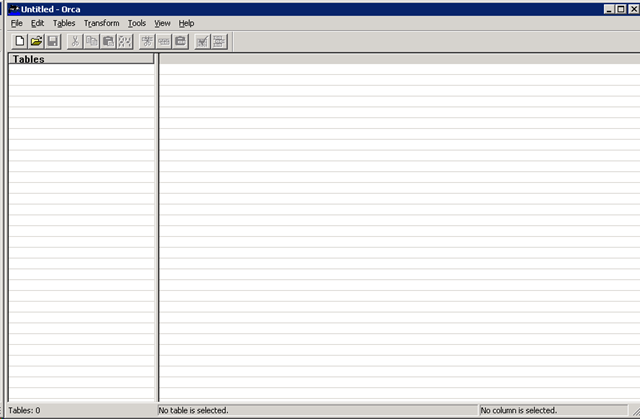
Once ORCA is opened you get a very vanilla interface:

image

In the File menu open your MSI file and check out the contents of the file. Check out the FeatureComponents listing to find where your associations are.

clip_image002[5]

Resolution:

I was able to quickly find the features that were incorrectly associated. You can actually use this tool to directly edit the MSI file (so be careful) but this also gave me the knowledge about which components were incorrectly linked to go dig through the IDE and make corrections.


California vs. Atlanta Startup mindsets

June 19, 2009

I just read a great post about “the California state of mind” which talks about the start-up environment in Silicon Valley and compares it to Atlanta, GA. There is some serious insight about how the start-up process differs (west Coast seems product driven and East Coast is customer-driven) and what can be done in Atlanta to see more startups succeed. I think this is something that needs to happen to revitalize the East Coast, especially the Southeast, where so much manufacturing has left over the last two decades there are not enough service jobs to go around (and the Biotech “boom” has yet to get off the ground).

It makes for interesting reading while waiting for software installers to compile.


What is WellRoundedDevelopment?

June 11, 2009

Well Rounded Development is a concept I promote to allow developers (professional and otherwise) to concentrate on more than just writing code but how that code works with the world.

I work in Software Engineering specifically in Build Engineering making sure everyone else’s code actually compiles at the end of the day (this is a metaphor…continuous integration doesn’t wait for the end of the day). This also means that when something breaks it is my job to track down what went wrong and get back to the development team to fix it (or fix it myself if I can). This role has exposed me to many different coding practices and styles which I will comment on in conjunction with information of how to build better software.

What is CxM? CxM stands for Customer X Management where the “x” often stands for “Relationship” but it can easily stand for other common nouns used for describing a process involving customers. once you abstract the nouns down to “x” you see how things relate to customers, internal and external, and you see how your code interacts with the world.

I didn’t come up with CxM…I shamelessly borrow the acronym from Microsoft’s Dynamics CRM presentations. it fits the way I’ve been talking about customer service for over a decade however.

Finally, why philosophy? Everybody talks about “beautiful code” or “code poetry” because it is nice to look at and easy to read. I think there is more to be learned by looking at the thought patterns behind writing this type of code – the mental clarity required for beautiful code to just happen.

Developers need to be like a Renaissance man, a person who has many skills to deal with whatever problems may be faced in a day. Knowing the deeply technical ins-and-outs of one language may be enough for some (who are lucky enough to specialize) but most of us have to not only know a language (and the patterns and practices of that language) but we must constantly be learning (and relearning) development principles and new technologies that are always emerging. When you build software that combines four programming languages plus a few scripting languages you are constantly learning just to stay in front of the process.

I look forward to sharing the ride with you.

— David


Design a site like this with WordPress.com
Get started